

Apple’s annual World Wide Developers Conference (WWDC) brought a myriad of good news for the iPad Users. The announcements at WWDC 2019 keynote included the introduction of a Mac Pro, apple iOS 13 with dark mode, MacOS Catalina, new features to the Watch & an exclusive apple iPadOS for iPad.
The tech Giant, Apple believes that iPads radiate its long-lived vision of what future computing would be like. However, what made the iPads less efficient for actual work was the lack of proper file organization.
The iPad users could not-
- Download the files within Safari
- Employ Files app of iOS to create local folders to save data
In order to mitigate the challenges faced by iPad users, Apple brought about a colossal software update – Apple’s new iPadOS.
Launch of iPadOS gave Apple tablets their own Operating System
Apple organized WWDC 2019 in San Jose, California on June 3, 2019. Craig Federighni, Apple’s Senior Vice-President of Software Engineering, introduced brand-new features added to the download manager for Safari. He further elaborated the revamped file management approach.
The Apple iPadOS features a plethora of new capabilities, boosts iPad’s productivity & brought its potential to replace a full-fledged laptop to the fore.
In the recent past, Apple’s iOS Mobile Operating System was being used to power iPhones as well as iPads.
However, the announcements made at WWDC 2019 revealed that the iPhones will be upgraded to apple iOS13, while the Advent of iPadOS will allow iPads to exhibit its tablet features.
Features of iPadOS
- File Management– In iOS version 11 & onward, users could manage their data stored on iCloud Drive & other cloud storage devices by using the Files App. The iPad’s file management was limited to cloud storages only. Though this approach helped the users to easily access the files on other iOS devices, the on-board storage space of up to 1 TB on the recent iPad Pros could be accessed by users with deep pockets.
The revamped file management approach emphasizes on the folder structure with a column view. The Files App in apple iPadOS has received a huge upgrade. It will incorporate zip & unzip features, local storage & newfangled Column View.
With the addition of more fleshed-out support for external storage devices in iPads, the users can now create folders on-device to organize their files.
Now, the files can be easily migrated for storage & later use from USB thumb drives on to the iPad. In addition to that, the files can be imported directly into apps, e.g., Lightroom.
- Download Files– iPad users can now actually download files while surfing the web on Safari. The default settings let you save the files in iCloud Drive.
However, with iPadOS, users can now save the downloaded files directly in the iPad Storage in an easily accessible folder.
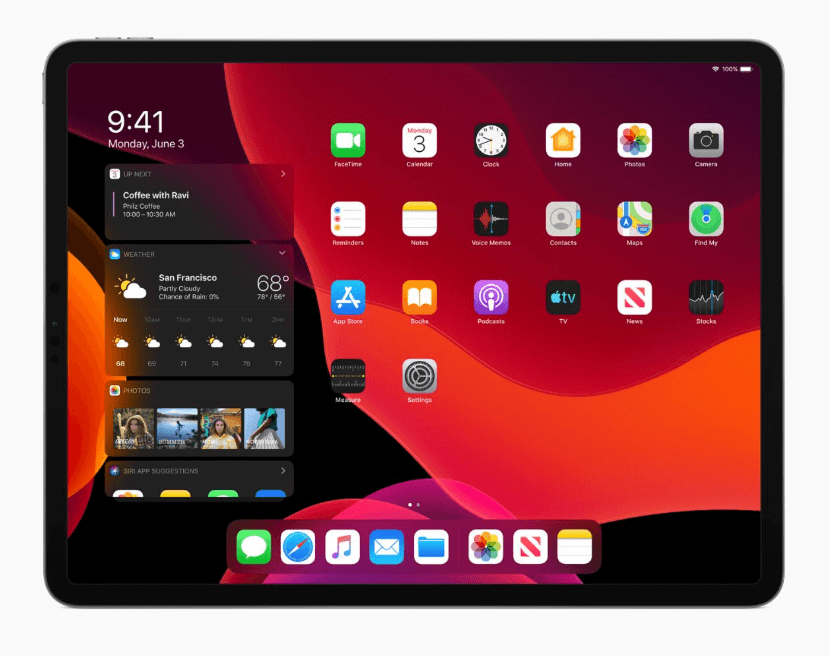
- The UI of iPadOS– The icons of the Apps in the new Apple iPadOS are more closely aligned. It imparts a closer look to MacOS’ Launch Pad & more space for the apps to be displayed at a time.
Another significant feature added to iPadOS is the new split-view. Users can now work on multiple files & documents from the same app, allowing them to multi-task. In addition to that, two Safari tabs can be displayed side-by-side, which will let the users browse internet on one & watch videos on the other.
It is evident that these subtle updates in the iPads have the potential to make it a feasible replacement for laptops.